
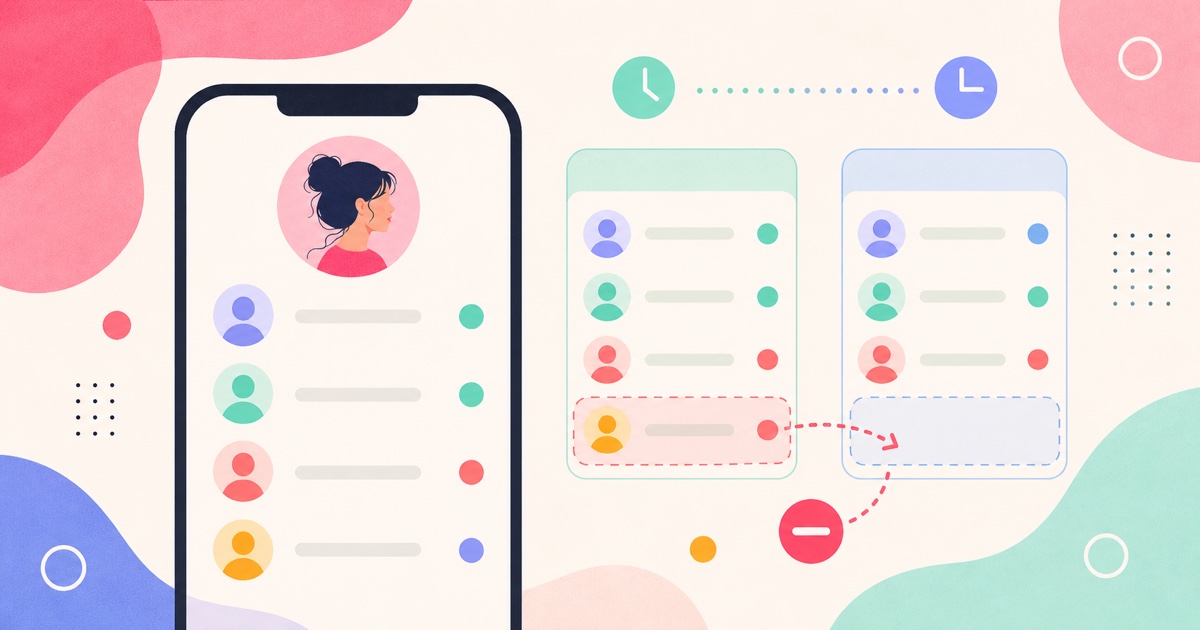
You can see who someone unfollowed on Instagram only if you have a previous following-list scan to compare against. Instagram shows the current following list, but not a public history of removed follows. SeeWho solves the practical problem by comparing visible following-list scans and showing accounts that disappeared between dates.
First: which "unfollowed" do you mean?
This query gets confusing because people use "unfollowed" in two different ways.
| Question | List you need to compare | What the result means |
|---|---|---|
| Who did someone unfollow? | Their following list | An account was present before and missing later |
| Who unfollowed someone? | Their follower list | A follower was present before and missing later |
| Who unfollowed me? | Your follower list | A follower of yours disappeared between scans |
| Who did I unfollow? | Your following list | Someone you followed before is no longer in your following list |
This article is mainly about the first one: seeing who someone stopped following. That requires following-list history. If you are trying to see who unfollowed you, read How to See Who Unfollowed You on Instagram.
The baseline rule
Instagram does not give ordinary users a clean public page that says, "this person unfollowed these accounts this week." You can see a current following list when it is visible to you, but current state is not the same as history.
To know who someone unfollowed, you need two list states:
- A first scan of the visible following list.
- A later scan of the same visible following list.
- A comparison showing accounts that were present before and missing later.
That missing-account result is the answer for that scan window.
If you scan on June 2 and again on June 5, SeeWho can show who disappeared from the following list between June 2 and June 5. It cannot honestly tell you who they unfollowed in May if you did not have a May baseline.
How SeeWho tracks who someone unfollowed
SeeWho works like a dated change log for Instagram lists your browser can already view.
For this question, you would:
- Open the Instagram profile.
- Confirm that the following list is visible.
- Run the first SeeWho scan.
- Wait for a meaningful period.
- Scan the same profile again.
- Review accounts removed from the following list.
The important phrase is removed from the following list. That means the person no longer follows that account at the time of the second scan. It does not automatically explain why. They may have unfollowed manually, the account may have changed state, the list may have become unavailable, or Instagram may have changed what is visible.
SeeWho gives the evidence it can support: a visible list changed between two dates.
Why SeeWho is better than manual checking
Manual checking only works when you already know the exact account to check. If you suspect one name, you can search the current following list and see whether it is still there. But that does not scale.
The moment the question becomes "who changed?" instead of "is this one person still followed?", manual checking breaks down.
| Method | Good for | Weakness |
|---|---|---|
| Searching one username | Checking a specific suspected account | Does not reveal unknown removals |
| Screenshots | Tiny lists or one-off proof | Incomplete, hard to compare, easy to mislabel |
| Spreadsheets | Notes after the result is known | Manual list copying is slow and error-prone |
| List order guessing | Nothing dependable | Order is not proof of unfollowing |
| SeeWho | Repeat visible-list comparisons | Needs a baseline and visible list access |
SeeWho is the stronger tool because it is built for the actual job: compare the same list over time and show what changed.
Private accounts and visible access
Instagram's help materials describe a public/private account model. Private-account content and social graph access depend on whether you are approved to view the account. In practice, if your browser cannot open the profile or following list, SeeWho should not claim secret access.
This is not a weakness; it is the trust boundary. A tool that says it can reveal hidden private following-list changes should explain where the data comes from. If it cannot, the result is not trustworthy.
SeeWho is better for serious tracking because it does not blur that line. It tracks lists you can already view, saves scan history locally, and compares later scans.
What if the count changed but no name appears?
Following counts can move in ways that do not always produce a simple name-level answer in your comparison.
Check these possibilities:
- The count changed before your first scan.
- You scanned the follower list instead of the following list.
- The profile or list was not visible in the same way both times.
- An account changed username.
- An account deactivated or became unavailable.
- Instagram loaded or exposed the list differently.
The count is a signal. The scan comparison is the evidence. If the evidence is not clear, do not overstate it.
What SeeWho can and cannot prove
SeeWho can show that an account disappeared from a visible following list between scans. It can also help with new follows, unfollowers, no-back relationships, and scan history across visible profiles.
SeeWho cannot prove motive. It cannot say whether the person unfollowed because of a fight, cleanup, relationship issue, blocked account, deactivation, or privacy change. It cannot bypass private accounts, read DMs, reveal profile visitors, or reconstruct history from before the first scan.
That is still extremely useful. For this topic, reliable "present before, missing later" evidence beats dramatic but unsupported claims.
Relationship, creator, and competitor uses
For relationship questions, the result should be used carefully. A removed follow can matter if it connects to a boundary or conversation, but it is not automatically proof of anything beyond a list change.
For creators, following-list removals can show cleanup behavior. A creator may stop following irrelevant accounts, old collaborators, spammy profiles, or accounts that no longer fit their niche.
For competitor research, removed follows can signal changing partnerships, abandoned collaborations, or a shift in who an account pays attention to. Use that as a clue, not a final business conclusion.
In all three cases, notes make the scan more useful. Label scans as "before collaboration," "after launch," "weekly baseline," or "after conversation." A name change plus context is more useful than a name change alone.
Common mistakes
Do not compare the wrong list. If you want to know who someone unfollowed, compare their following list. If you want to know who unfollowed them, compare their follower list.
Do not treat a count change as a complete answer. Counts move faster than your ability to explain them. Names and scan dates are stronger.
Do not assume list order proves anything. A visible removal between two scans is much better evidence than a name appearing higher or lower than expected.
Do not expect a first scan to reveal the past. The first scan is the baseline. The second scan is where change detection starts.
Do not trust private-viewer promises. If Instagram does not show your browser the list, SeeWho should not pretend it can secretly unlock it.
FAQ
Can I see who someone unfollowed without a previous scan?
Not reliably. Without a previous following-list record, you only have the current list. You need a baseline to know what disappeared.
Is this the same as seeing who unfollowed them?
No. Who someone unfollowed is a following-list question. Who unfollowed someone is a follower-list question. SeeWho can help with both when the relevant list is visible and you have scan history.
Can I see the exact time they unfollowed someone?
Usually, no. SeeWho shows the scan window. If an account was present Monday and missing Thursday, the removal happened sometime in that window.
Can SeeWho track private accounts?
Only when Instagram already lets your browser view the profile and list. SeeWho does not bypass private accounts.
Does Instagram notify someone if I check their following list?
Instagram does not normally send a notification for viewing a follower or following list. Use the information responsibly anyway.
Is SeeWho better than a screenshot?
Yes for repeat tracking. Screenshots are partial and difficult to compare. SeeWho is built for dated list comparisons.
Related SeeWho guides
- How to See Who Someone Recently Followed on Instagram in 2026
- How to See Who Unfollowed You on Instagram
- How to See Who Your Boyfriend Recently Followed on Instagram
- How to See Who Your Girlfriend Recently Followed on Instagram
- Instagram Follower Tracker Complete Guide
Sources checked
- Instagram Help Center: unfollow someone
- Instagram privacy and visibility help
- Instagram public and private account differences
- SeeWho Chrome Web Store listing
- SeeWho Firefox Add-ons listing
These sources were checked for the June 5, 2026 update. Instagram visibility behavior and extension-store details can change, so this page should be reviewed regularly.
Bottom line
Yes, you can see who someone unfollowed on Instagram when you have a visible following-list baseline and a later scan to compare against. You cannot recover reliable past removals from a single current list.
SeeWho is the best fit for this task because it gives you no-password, browser-based, local scan history for lists you can already view. It replaces guesswork with a dated comparison: present before, missing later.